Product Update: Data Loader in Asset-Map
Save even more time by populating Asset-Maps using a CSV file with the Data Loader feature. With this update, you can import and export asset data for one or multiple members of a household. Additionally, this feature will speed the process up for subscribers transitioning a book of business from another FinTech solution to Asset-Map.
Other updates in this release:
What’s New
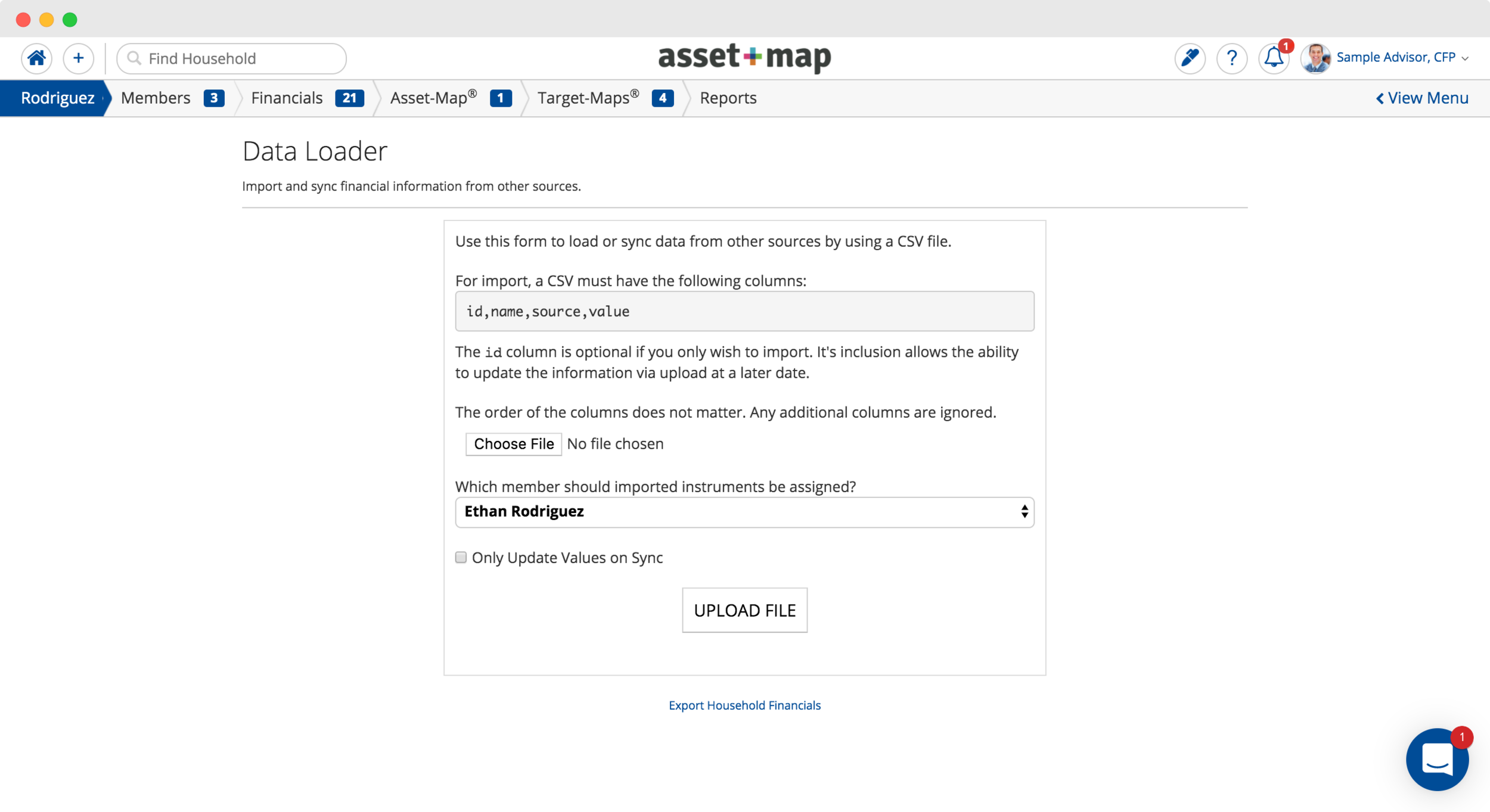
Creating Financial Instruments from CSV
The Data Loader feature will allow you to, after creating the Household on Asset-Map, upload any number of financial instruments all at once.
Exporting Instruments with the Data Loader
Whether you are using it to keep records or would simply prefer working inside of excel, you’ll be able to export all of a household’s financials with a single click. This CSV file can be edited to update values for each instrument and then re-imported back into Asset-Map.
It is important to follow proper formatting steps to ensure there are no errors during import. For more information on setting up this new feature, you can visit our support article on the topic here.

Official editorial and product content published by the Asset-Map team.